FLOWPAMINE
CASE STUDY
An AI-powered workspace designed for
thinking, planning, organising, and execution.
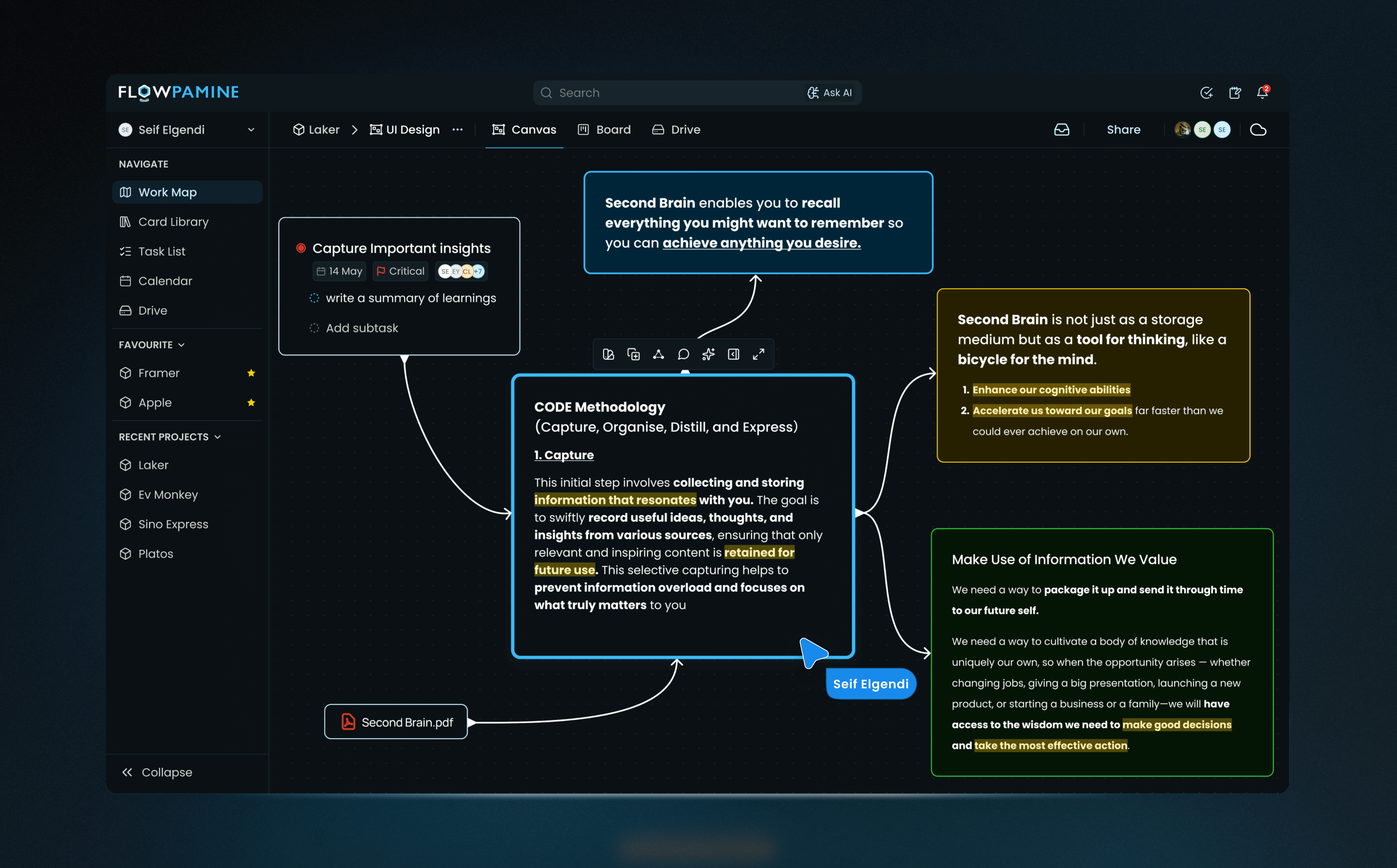
Flowpamine is a neuroscience-inspired SaaS productivity platform that helps visual thinkers, researchers, founders, and consultants capture, organize, plan, and execute their work in a way that mirrors how the brain processes information, by unifying notes, tasks, and files in one intelligent workspace.
Role
Sole Product Designer (Product Strategy, UI/UX, Branding, Web)
Type
SaaS Productivity Platform
Platform
Web & Desktop App
01 - VISION
Work should flow,
not fragment.
Modern productivity tools are overwhelming.
They're cluttered, rigid, and mentally draining especially for creatives, founders, and consultants juggling strategic thinking and execution. Most platforms treat tasks, notes, and time as isolated units, leaving users in a constant state of context-switching and cognitive overload.
Flowpamine was built as an alternative to that patchwork the vision was a single workspace that aligns with how the brain works not just another app to manage work, but one that helps you think, plan, and stay in flow.
The system blends neuroscience principles with design clarity to reduce mental fatigue, support deep thinking, and preserve knowledge. It's for:
Visual thinkers who hate traditional lists
Agile teams in legal, marketing, researchers and consulting
Founders needing strategic clarity, not bloat
The defining idea behind Flowpamine is that context should travel with work. A note written during discovery should live next to the tasks it spawned. A file referenced in a whiteboard session should be traceable back to the project it belongs to. Everything connected. Nothing duplicated.
What makes Flowpamine different from other productivity tools isn't the feature list, it's the architecture. The system is designed so that every piece of work exists in relationship to other pieces, never in isolation.
02 - PROBLEM & OPPORTUNITY
The real cost of
scattered tools.
The problem isn't that existing tools are bad. Notion, Jira, and Google Drive each do their job well. The problem is the space between them. Every handoff between tools is a place where context gets dropped, decisions get forgotten, and momentum dies.
PAIN POINT 01
Context gets lost in translation
When an idea moves from a whiteboard to a task to a document, the thinking behind it disappears. By the time work reaches execution, nobody remembers why decisions were made.
PAIN POINT 02
AI tools don't know your work
People copy and paste into ChatGPT and Gemini, re-explaining context they've already documented. Every time they switch to an AI tool, they start from zero.
PAIN POINT 03
Thinking and doing live in different places
Ideas live in one place, tasks in another, documents somewhere else. The transition from messy thinking to structured execution is entirely manual.
PAIN POINT 04
Deliverables take too long to produce
Founders and consultants spend hours reformatting raw notes into proposals, briefs, and reports. The thinking is already done. The structure and formatting shouldn't take that long.
WHERE TEAMS LOSE CONTEXT
Tasks created with no record of why they exist
Files scattered with no connection to a project
Notes written during planning that never reach execution
No single view of what's actually happening
WHERE THE MARKET MISSES
Project tools focus on tasks, not thinking
Note tools don't connect to execution
Whiteboards sit completely outside the workflow
Integrations patch symptoms without fixing structure
The opportunity: build a workspace where the relationship between ideas, tasks, and files is structural, not reliant on user discipline, integrations, or workarounds.
03 - MY ROLE AND OWNERSHIP
End to end.
Every layer.
I was the only designer working on Flowpamine, responsible for defining the problem, architecting the system, building the detailed design system, involving in marketing, developed the landing page for Flowpamine, and delivering the final prototype UI across all five core surfaces.
OWNED
Product and design
Vision definition, system architecture, core product logic, content relationships, UX flows, component design, design system, prototype, and final visual delivery. In addition, to this I developed the landing page for Flowpamine.
COLLABORATED
With PM and engineering
Worked with the product manager to define MVP scope and with the development team to ensure every architectural decision was technically buildable without rework.
Designing solo at system scale forces a different kind of discipline. Without a team to catch oversights, every decision needs to be defensible, not just visually, but structurally and logically.
04 - THE PRODUCT AT A GLANCE
The product,
in motion.
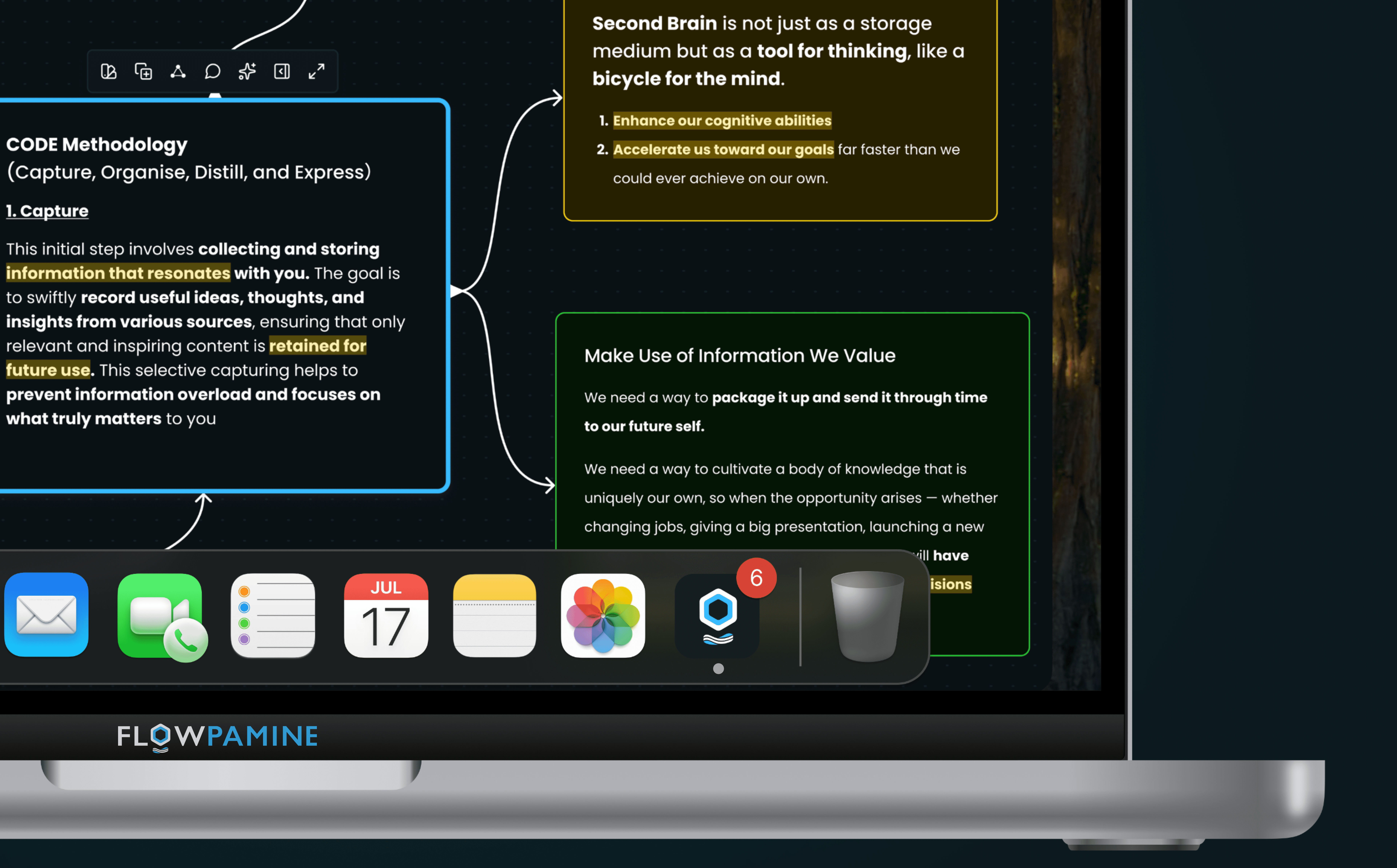
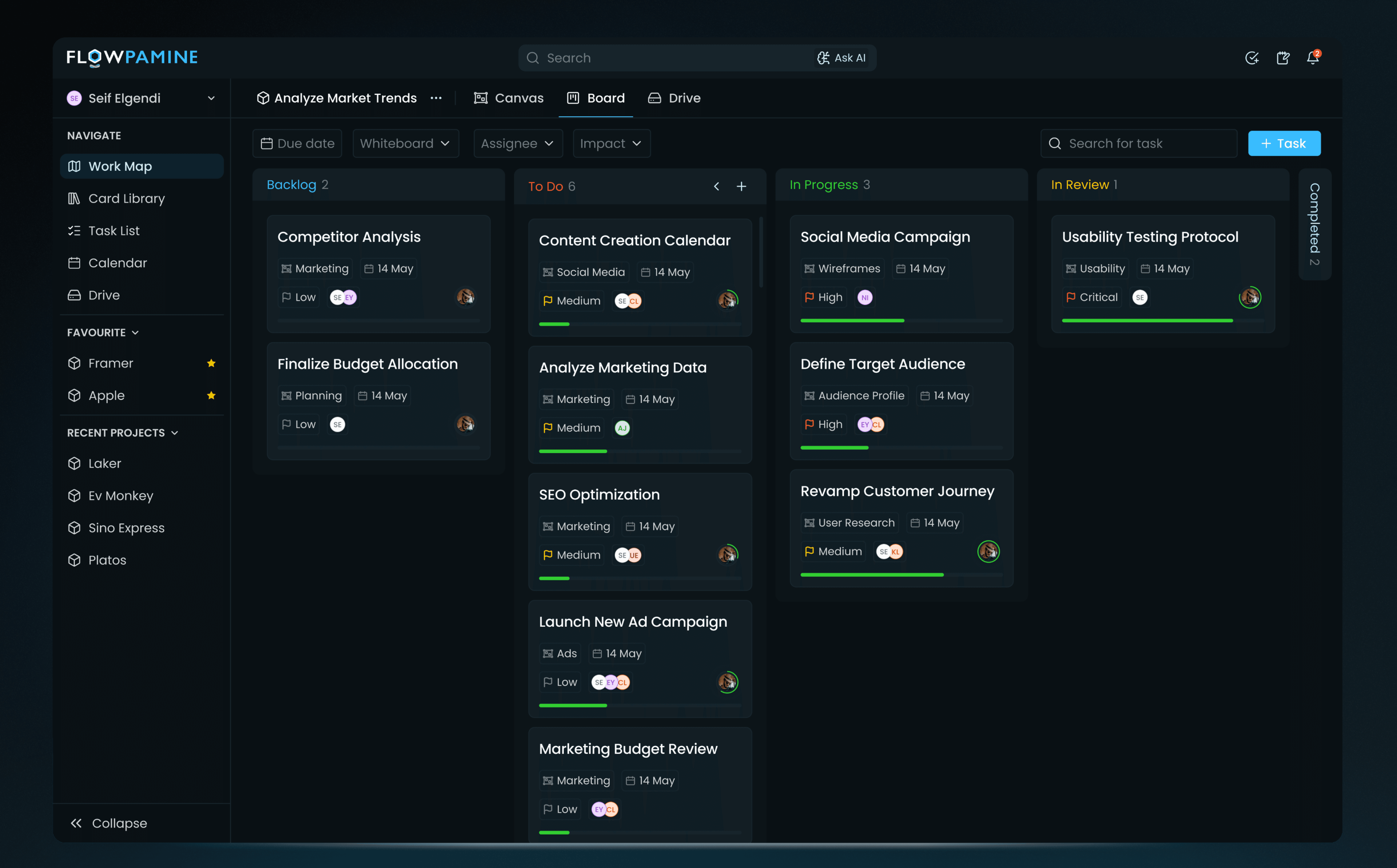
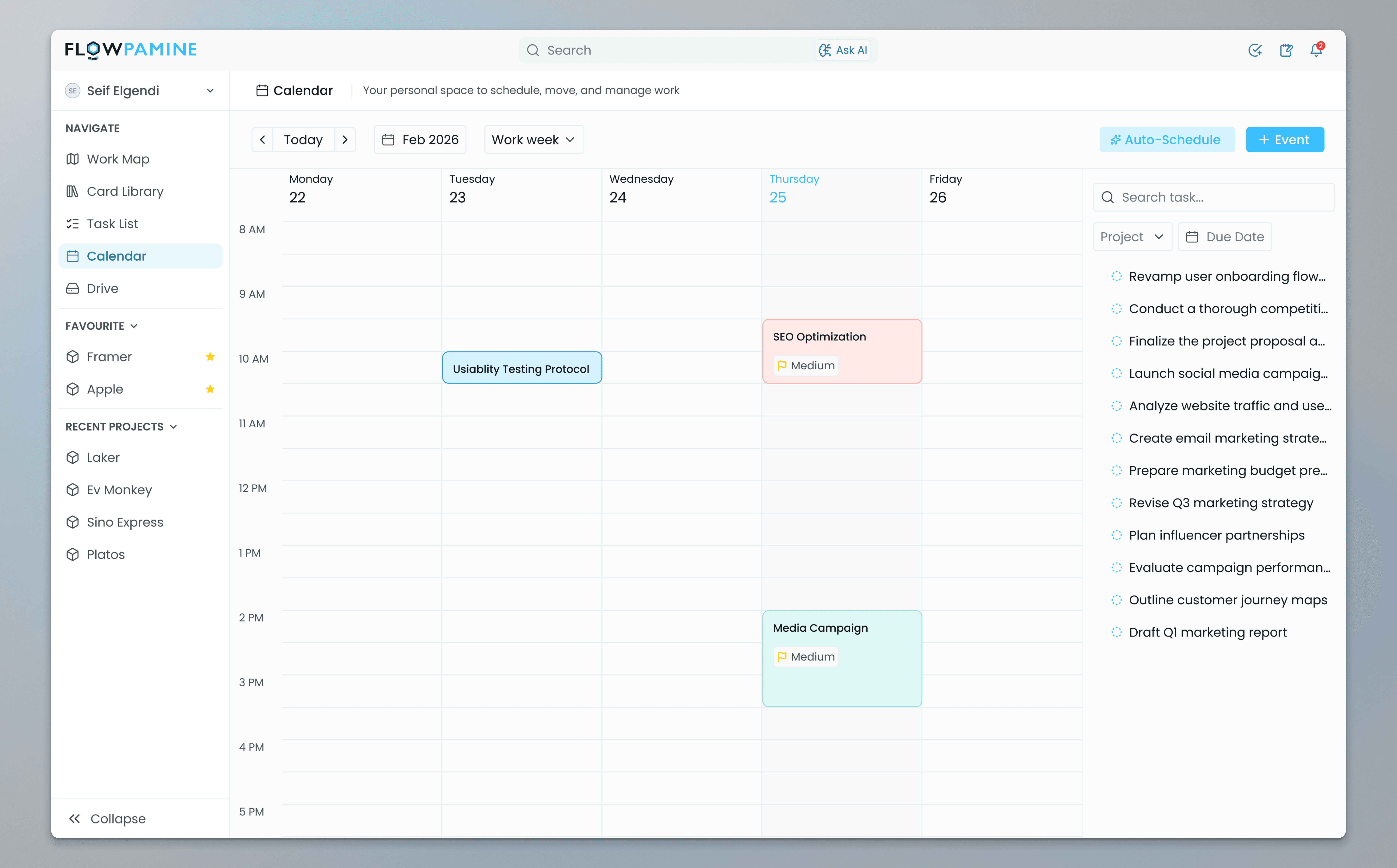
Three surfaces. Each one covering a distinct layer of how work moves through the system from navigating what exists, to managing what needs to get done, to planning when it happens.

Want to see the full product?
I am happy to walk through every screen, the interaction details, and the design system with anyone seriously considering a conversation.
05 - CONSTAINTS AND CONTEXT
Designing within
real limits.
Every decision in Flowpamine was made against a backdrop of real constraints. Acknowledging them early is what kept the system buildable.
CONSTRAINT 01
Active development, evolving scope
Flowpamine is currently in development. This meant every architectural decision needed to be developer-ready, not just conceptually sound, but technically communicable and implementable without major rework. Design decisions directly constrain development cost.
CONSTRAINT 02
Scope versus complexity
The system could theoretically expand infinitely more views, more linking logic, more automation. The constraint was restraint: build a complete system that doesn't overwhelm, with clear extensibility points for later phases.
CONSTRAINT 03
B2C product with B2B ambition
Flowpamine is designed as a B2C platform architected for B2B scalability. That tension shaped every structural decision. The UI needed to feel accessible to individual users while supporting the kind of team-level permissions and multi-project depth that B2B customers expect.
06 - PRODUCT ARCHITECTURE
The system.
from root to edge.
The architecture of Flowpamine isn't a feature list. It's a set of deliberate structural decisions about how information lives, relates, and moves through a workspace.
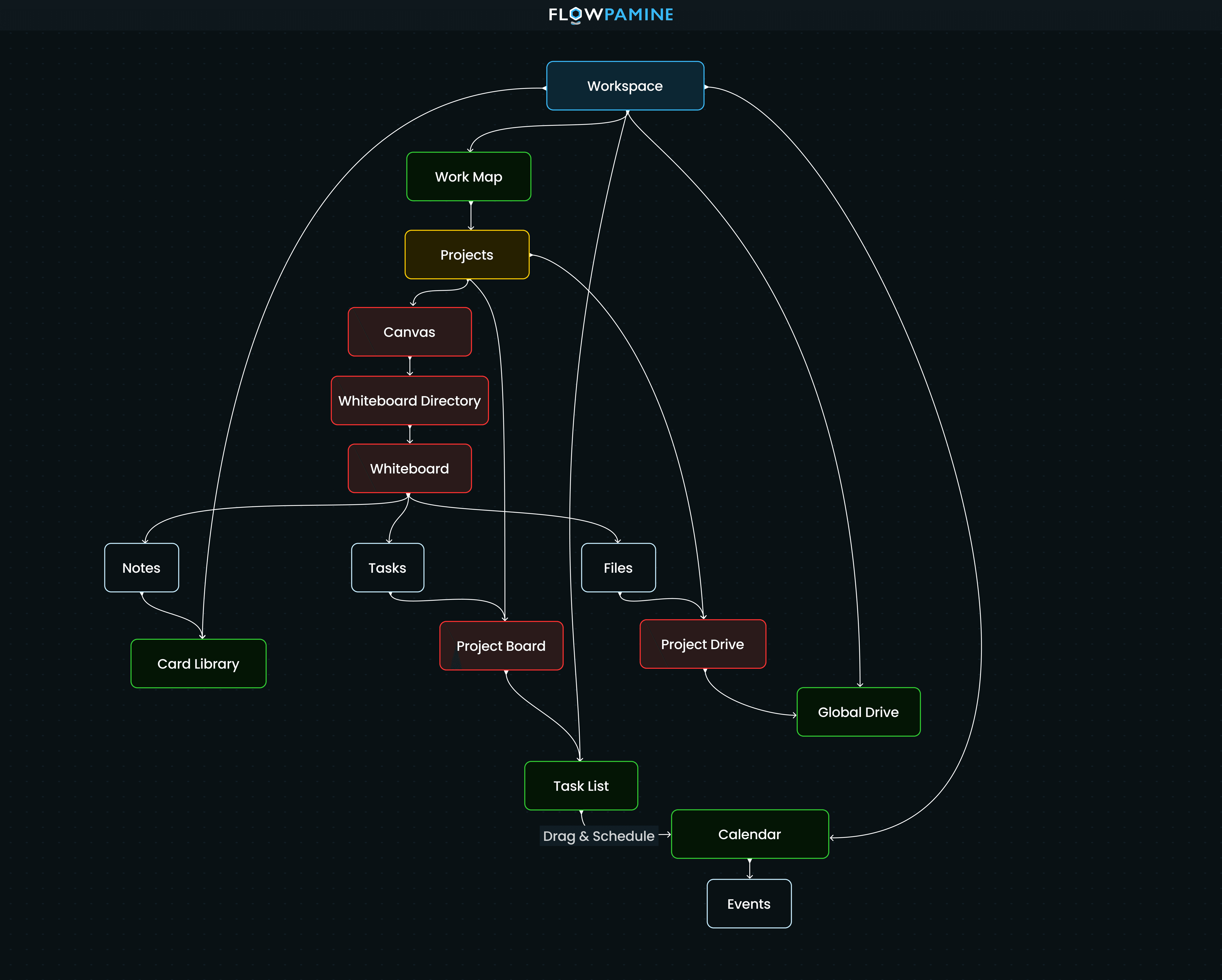
The core hierarchy flows from Workspace down to Work Map, then into Projects. Each project contains three surfaces: Canvas for visual thinking, Board for structured task management, and Project Drive for file storage. Alongside projects, the workspace also has a Card Library for global notes, a user-scoped Task List, a Calendar, and a Global Drive.
Each layer has a specific job. The Work Map is navigation. The Canvas is the thinking layer. The Board is execution. The Drive layers handle files at both project and workspace scope. The Calendar and Task List are personal, they aggregate across all projects and belong to the individual user.
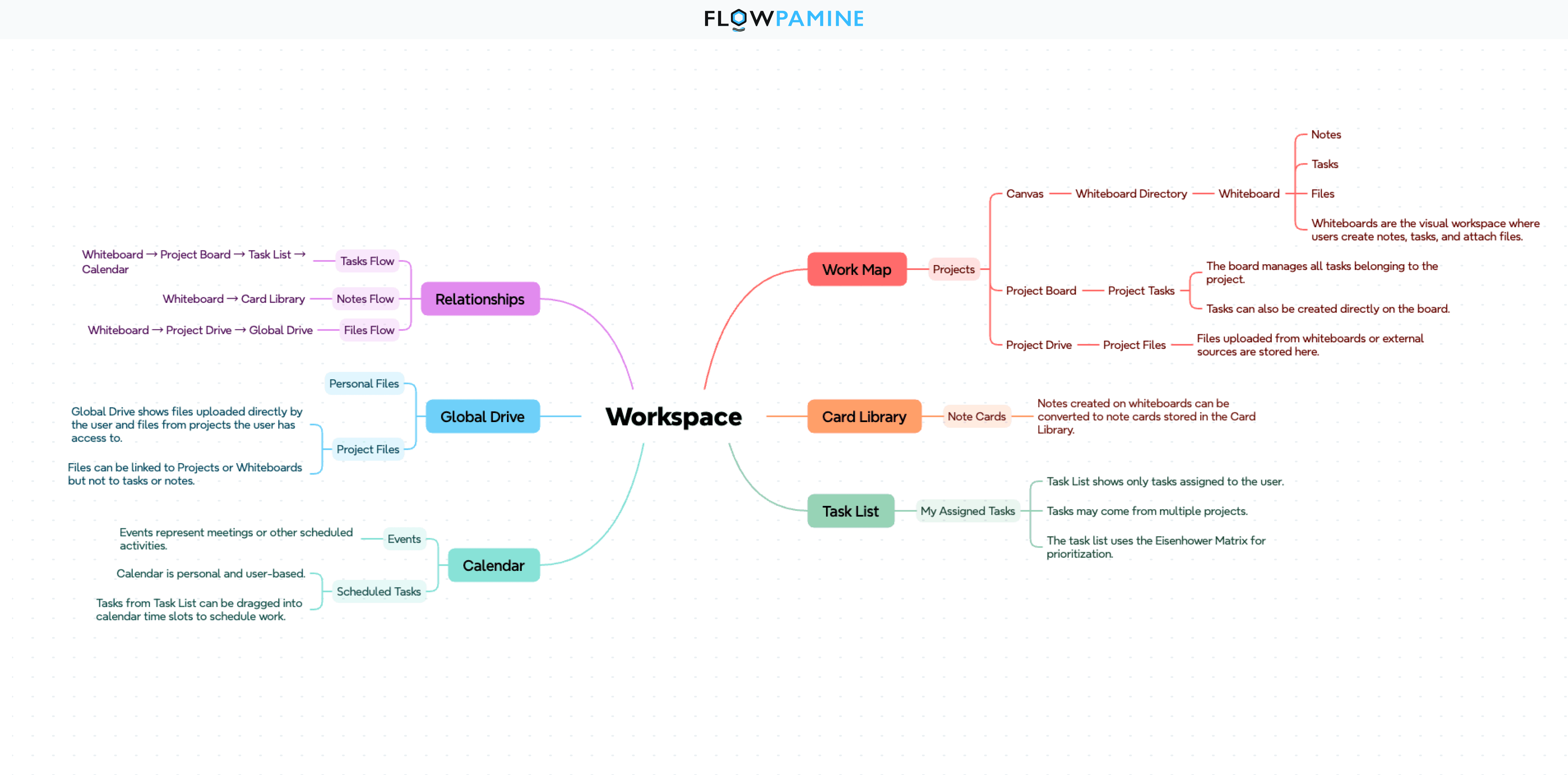
The rules governing how content relates across these layers are what make the system coherent rather than just feature rich.
NOTES
Belong to one project as their source.
Can appear on multiple whiteboards.
Can be added to other projects as a copy or shortcut.
Collected in the Card Library globally.
TASKS
Can exist without a project.
Board tasks must link to a project.
Appear in the user-scoped Task List.
Scheduled through the Calendar.
FILES
Exist independently in Drive.
Link to projects or whiteboards.
Do not link to tasks or notes.
Accessible globally via Global Drive.
07 - KEY PRODUCT DECISIONS
Why things are
the way they are.
These are the decisions that shaped Flowpamine's structure. Each one had real alternatives, and understanding why those alternatives were rejected is as important as understanding what was chosen.
DECISION 01
Canvas is the central thinking space, not a peripheral feature
Notes, tasks, and files coexist on the whiteboard, making it the bridge between thinking and execution, not a disconnected brainstorm room.
REJECTED
Keeping whiteboards separate would have reproduced the exact context-loss problem Flowpamine is built to solve.
DECISION 02
Files link to structure, not to individual content objects
Scoping file relationships to projects and whiteboards prevents the web of micro-dependencies that makes file systems unmanageable at scale.
REJECTED
Task-level attachments feel intuitive early but produce hundreds of orphaned files with no coherent home.
DECISION 03
Task List uses the Eisenhower Matrix, not a flat list
Prioritization is built into the view structure itself. The user makes an importance-urgency decision at the moment of organizing, not after a long list has already overwhelmed them.
REJECTED
Flat chronological lists produce the same anxiety that makes every personal productivity tool eventually get abandoned.
DECISION 04
Calendar is user-scoped across all projects
Scheduling is about the person's time. A single user-level calendar means someone sees their full week without jumping between project calendars.
REJECTED
Project-level calendars fragment scheduling and force exactly the context-switching Flowpamine is designed to eliminate.
08 - AI SYSTEM
Intelligence built into
the workflow.
Flowpamine's AI isn't a chatbot added to the product. It's a structural layer built into how information moves through the workspace. No prompts to write. No context to re-explain. The system already knows what you're working on.
The opportunity: build a workspace where the relationship between ideas, tasks, and files is structural, not reliant on user discipline, integrations, or workarounds.
ASK AI
AI that responds when you ask
Select what you're working on. Those objects become context tags instantly. Express an intent. AI responds, no re-explaining, no copy-pasting.
Context Engine indexes the full workspace continuously
Task Generation turns whiteboard thinking into structured tasks
Output Engine compiles notes into briefs and proposals
Workspace Memory recalls past decisions when you start something new
BACKGROUND AI
AI that works silently
Quick notes get processed, raw thinking gets split into tasks and notes, related work from other projects surfaces without being asked. The user never triggers it, they just open the Side Panel and find everything ready.
Quick Note: capture any thought without assigning it to a project
AI Inbox: splits notes into tasks and notes, linked automatically
Side Panel: Recommend, Inbox, Other Projects, all draggable onto the canvas
SMART SUGGETIONS
AI that surfaces what to act on
Notices what users miss, unscheduled tasks, unclear priorities, stale work. Everything surfaces as a suggestion with a clear call to action. Nothing changes until the user confirms.
Auto Schedule: suggests a calendar plan for unscheduled tasks
Auto Prioritize: recommends task order with brief reasoning
Stale Work Detection: quiet nudges for items going untouched
Weekly Digest: what's done, in progress, and at risk
SMART CANAS
AI that thinks with you on the whiteboard
Lives directly on the canvas surface. Reads every card, gap, and pattern in real time. Responds as visual elements. ghost cards, dotted connections, inline suggestions, that wait for a decision before doing anything.
Ghost cards: predicted at the end of sequences
Dotted connections: suggested between related cards
Inline content: suggestions as you type, frameworks, past decisions
Relationship Map: live toggle showing how everything on the canvas connects
09 - DESIGN SYSTEM
Built to scale
from day one.
Five surfaces and a full AI layer can only stay visually coherent if the system underneath them is treated as a product, not a Figma library added after the fact.
LAYER 01
Primitives
Raw foundation: Every color value, type size, spacing step, radius, and elevation defined as a token. Nothing in the system uses a hardcoded value. Global changes propagate everywhere without breaking anything downstream.
LAYER 02
Semantic Tokens
Meaning over values: Primitives assigned intent. "Gray 200" becomes "surface secondary." "12px" becomes "space small." Components reference semantic tokens, which is what makes full dark and light mode work without maintaining two separate component sets.
LAYER 03
Component Specific
Scoped overrides: Token overrides scoped to individual components where the semantic layer isn't specific enough. Every value traces back through semantic to primitive. No magic numbers anywhere in the system.
WHAT THE SYSTEM COVERS
Color: full dark and light mode via semantic tokens
Typography: scale, weight, line height, letter spacing
Spacing: 4px base grid applied consistently everywhere
Elevation, radius, and motion, all tokenized
COMPONENT ARCHITECTURE
Atoms: buttons, inputs, tags, avatars, icons
Molecules: card headers, form rows, toolbar clusters
Organisms: boards, panels, navigation bars
All components documented with states and edge cases
10 - DEVELOPER HANDOFF & TRADE-OFFS
Built to scale
from day one.
Every content relationship in Flowpamine, which objects link to which, what's user-scoped versus project-scoped was documented as explicit logic rather than left implicit in the design. The handoff is a specification, not an interpretation.
Design token naming was aligned to development variable conventions from the start. Component states, edge cases, empty states, and error paths were all documented before handoff.
No system design comes without trade-offs. These are the ones worth naming:
CHALLENGE
WHAT I SIMPLIFIED
THE TRADE-OFF
File linking scope
Files link to projects and whiteboards only,
not to tasks or notes
Some granularity is lost, but the file system stays manageable at scale
Cross-project dependencies
Global Drive and user Calendar provide workspace-wide views
Cross-project task dependencies are a known V2 point
Onboarding
System logic is well defined, onboarding design is not yet complete
A documented gap to close before launch
11 - REFLECTION
What this
taught me.
WHAT THE SYSTEM COVERS
System design happens before Figma opens. The rules governing how content relates matter more than any screen, and they're what makes the UI feel inevitable rather than assembled.
WHAT I WOULD IMPROVE
Onboarding should be designed in parallel, not at the end. A system this structured needs a first-time experience that matches the thinking behind it.
WHAT I'M PROUD OF
The content relationship logic and the AI architecture. Getting both right meant resisting the urge to make everything connect to everything. Restraint in systems is harder than flexibility, and more valuable.
The shift that defined this project: moving from designing screens to designing a system. The most important decisions in Flowpamine are invisible in the UI. They live in the architecture underneath it.
Looking to start a project or you need consultation? Feel free to contact me.
Kuala Lumpur, Malaysia